It is Academic Book Week
this week – do you want to read books by our academic staff? Why not check
whether we have their books in our collection?
6. Your search results are then presented and you can browse the items available. If needed you can use more filters to focus the results.
Here I have selected to filter by subject.
This will reduce the search results to only items indexed against these subjects.
7. Don’t forget that you can submit a request if you would like the item saved for you.
Use Library Search to search for book titles by a particular
author.
1. You’ll find a link to Library Search on the Health Library homepage. Click the Library Search option.
 |
| screen-shot of library homepage |
2. Click the option "Search Books and more" to focus your search
on book titles.
 |
| screen-shot of Library Search |
3. You can just type the authors name into the search box.
 |
| screen-shot of an example author search |
The results are presented in a list.
 |
| screen-shot of example search results |
4. If you need to focus your search further, use the Advanced Search
option.
5. Select to search by author and enter the author’s name or part of their name. You can enter more than one name. Use the other filter options if you want to.
 |
| screen-shot showing the advanced search option |
5. Select to search by author and enter the author’s name or part of their name. You can enter more than one name. Use the other filter options if you want to.
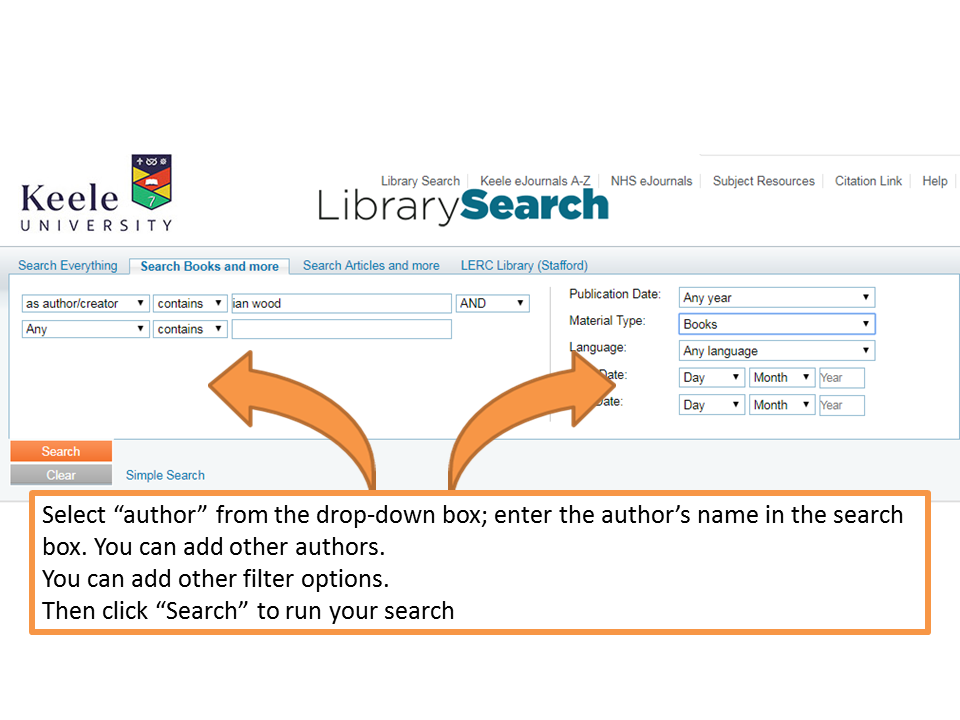 |
| Advanced search options |
6. Your search results are then presented and you can browse the items available. If needed you can use more filters to focus the results.
 |
| screen-shot of search results |
Here I have selected to filter by subject.
 |
| Screen-shot of filter options |
 |
| screen-shot of filtered results |
7. Don’t forget that you can submit a request if you would like the item saved for you.
Comments
Post a Comment